Keep ingredient costs accurate
Your margins are only as honest as your ingredient prices. This page covers the everyday upkeep: understanding where a price came from, fixing one, and linking an ingredient so it stays current on its own.
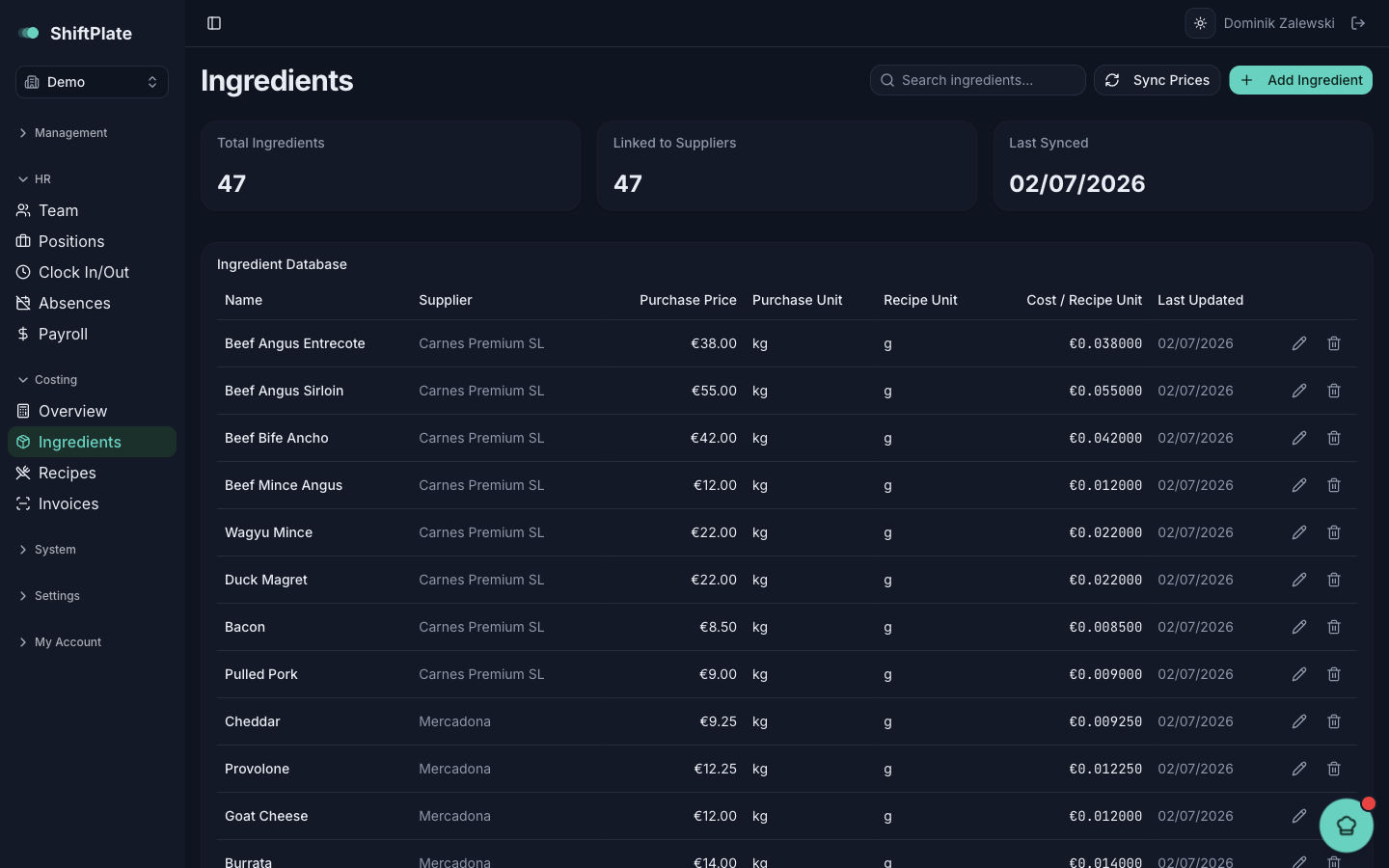
Everything here lives under Costing → View Ingredients — the Ingredient Database.
Two kinds of price
Every ingredient price has one of two sources, and a recipe tells you which:
- Estimated — you typed it in by hand. It carries an amber Estimated badge, with the note "Price is a manual estimate — never imported from a confirmed invoice". Treat it as a placeholder until a real invoice backs it up.
- From an invoice — the ingredient is linked to a supplier product, so a confirmed invoice set its price. The recipe's Price source column links to that invoice with the supplier and date.
An estimated price isn't wrong — it's just unverified. The goal over time is to move your key ingredients from estimated to invoice-backed.
Update a price by hand
When you need to correct a price yourself:
- In the Ingredient Database, click the pencil on the ingredient.
- Adjust the Purchase Price (€), and the Purchase Unit, Recipe Unit, or Conversion Factor if they're off.
- Watch the live Cost per unit preview — it's your purchase price divided by the conversion factor, so a €12/kg spice with a factor of 1000 costs €0.012/g.
- Press Save Changes.
Saving cascades: the ingredient's cost per recipe unit updates, every recipe that uses it is recosted, and margins move accordingly.
Getting the conversion factor right matters as much as the price. If you buy in kg but cook in grams, the factor is 1000. A wrong factor makes a dish look ten times cheaper or dearer than it is — the most common cause of a margin that looks too good to be true.
Link an ingredient to a supplier — so it stays current
The real fix for stale prices is to stop maintaining them by hand. When adding or editing an ingredient, use Link to Supplier Product (optional):
- Leave it on None (manual entry) to keep typing the price yourself.
- Pick a supplier product to link them. ShiftPlate fills in the name, price, and unit from that product — and from then on, confirming an invoice for that product updates this ingredient automatically.
Once linked, the ingredient rides along with your invoices: no more manual edits, and its recipes always reflect what you're actually paying.
Pull the latest prices now
Linked ingredients update whenever you confirm an invoice, but you can also refresh them on demand: on the Ingredients page, click Sync Prices. ShiftPlate pulls the latest supplier prices onto every linked ingredient and recosts the affected recipes, then tells you how many changed — or that everything was already up to date.
Sync Prices only moves prices for ingredients that are linked to a supplier product. Estimated (manual) ingredients don't have a source to sync from — link them first.
The upkeep habit
Keeping costs honest is mostly two habits: confirm your invoices (which updates linked ingredients for free), and link your high-volume ingredients so those updates land where they matter. Do that, and your margins stay trustworthy without a spreadsheet. Back to Read your margins to see the payoff.