Read your margins
Once a recipe has ingredients and a price, ShiftPlate shows you how profitable it is. This page explains those numbers so you know what to act on.
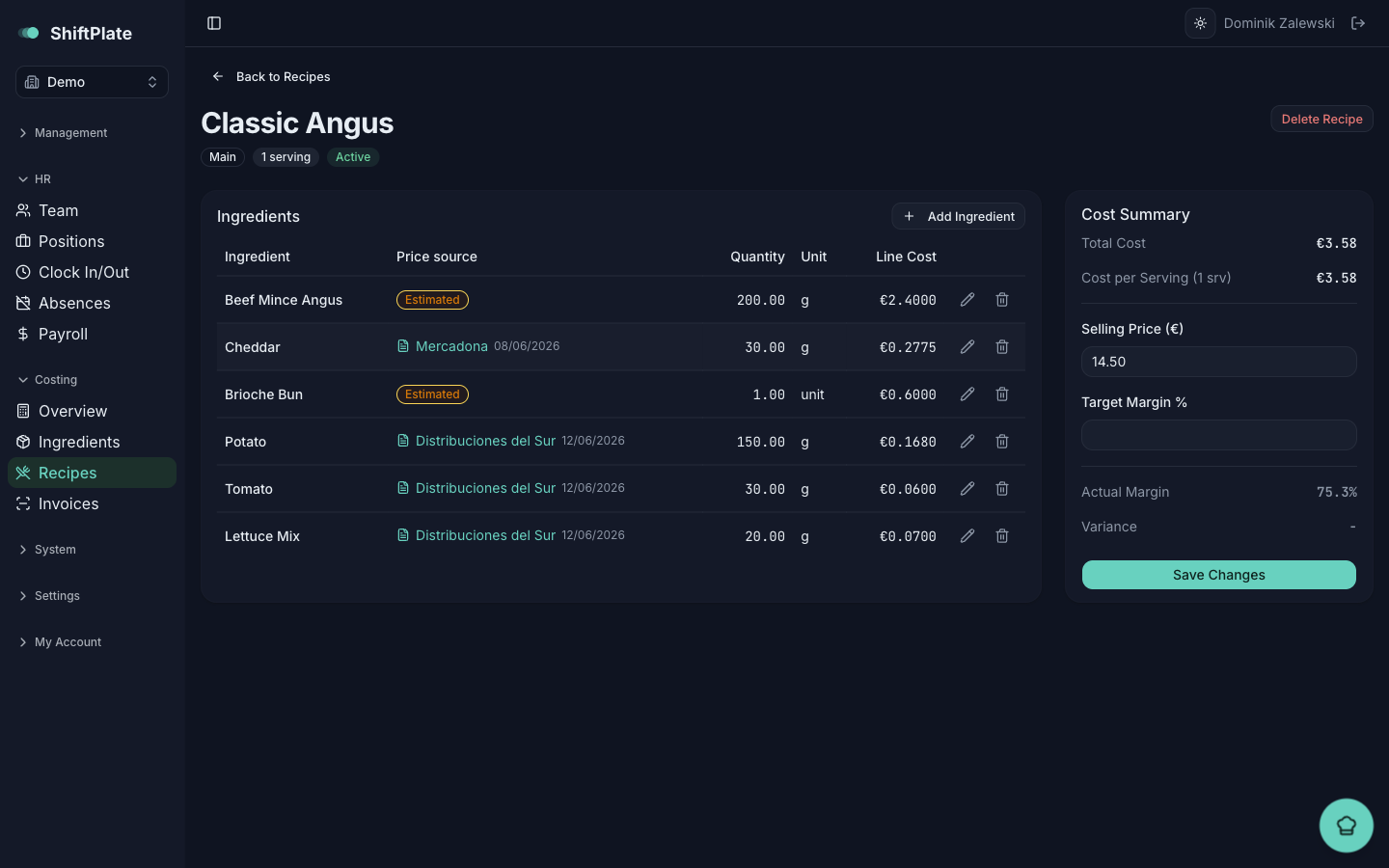
The Cost Summary card
Open any recipe and look at the Cost Summary card on the right. It shows, top to bottom:
- Total Cost — what all the ingredients cost to make one batch of the recipe.
- Cost per Serving — that total divided by the recipe's servings. This is the number that matters per plate.
- Actual Margin — the share of your selling price that isn't cost. A €12 dish costing €3 a plate has a 75% margin.
- Variance — how far your actual margin sits above or below your target.
+4%means you're ahead of target;−6%means behind.
Reading the colours
Margin and variance are colour-coded so you can judge a dish at a glance:
- Green — at or above target. Healthy.
- Amber — within 5 points below target. Worth watching.
- Red — more than 5 points below target. Needs attention.
Grey means a number is missing — usually no selling price or no target margin set yet, so there's nothing to measure against. Set both to get a live margin.
A dish only gets a margin at all once it has both a selling price and ingredients. If margin reads as "No data", check that both are in place.
The bigger picture
The Dish Costing overview turns all your recipes into a few headline numbers:
- Food Cost % and Drinks Cost % — what you spend on ingredients as a share of sales, split so drinks don't skew the food figure.
- Total Recipes, Dishes On Target, and Needing Attention — how much of your menu is meeting its margin goals.
- Top 5 Highest Margin and Bottom 5 Lowest Margin — your best and weakest dishes by margin.
Use the All / Food / Beverage toggle to focus on one part of the menu.
Margin Alerts
The Margin Alerts page is the shortlist of dishes to fix: every active recipe whose actual margin has fallen below its target. It shows each dish's selling price, cost per serving, target and actual margin, and the exact shortfall — biggest gaps first. If everything's healthy, you'll see "All dishes are meeting their margin targets" instead.
Click any alert to jump to that recipe. From there you have two levers: raise the selling price, or lower the cost by changing ingredients or quantities. Either way, the margin updates the moment you save.
A dish can slip below target on its own when a supplier raises a price and you confirm the invoice — the recipe is recosted automatically and may appear here without you touching it. That's the system doing its job: telling you a margin moved before it costs you a month of thin plates.
What's next
Margins are only as trustworthy as the prices behind them. Keep ingredient costs accurate covers where those prices come from and how to keep them honest.